
Introduction
Manufacturers today are under increasing pressure to process orders faster, reduce manual errors, and support a growing range of customer requirements. Traditional electronic data interchange systems often fall short when dealing with complex, configured products and evolving customer formats.
In 2026, solutions like DataBroker are transforming how manufacturers handle electronic order processing by eliminating manual data entry and simplifying integration across multiple formats and systems.
For make-to-order manufacturers, this shift represents a major opportunity to improve efficiency, accuracy, and customer satisfaction.
The Problem with Traditional EDI in Manufacturing
Traditional EDI systems were designed for standardized transactions, not for the complexity of modern manufacturing.
Common challenges include:
- Heavy reliance on custom programming
- Difficulty handling configured products
- Frequent mapping errors requiring resubmission
- Limited flexibility for different customer formats
When errors occur, orders often need to be resent by the customer, creating delays and frustration.
As noted in Friedman Corporation’s DataBroker overview, traditional EDI solutions are often a poor fit for configured product environments and require ongoing customization to maintain compatibility .
What Is DataBroker?
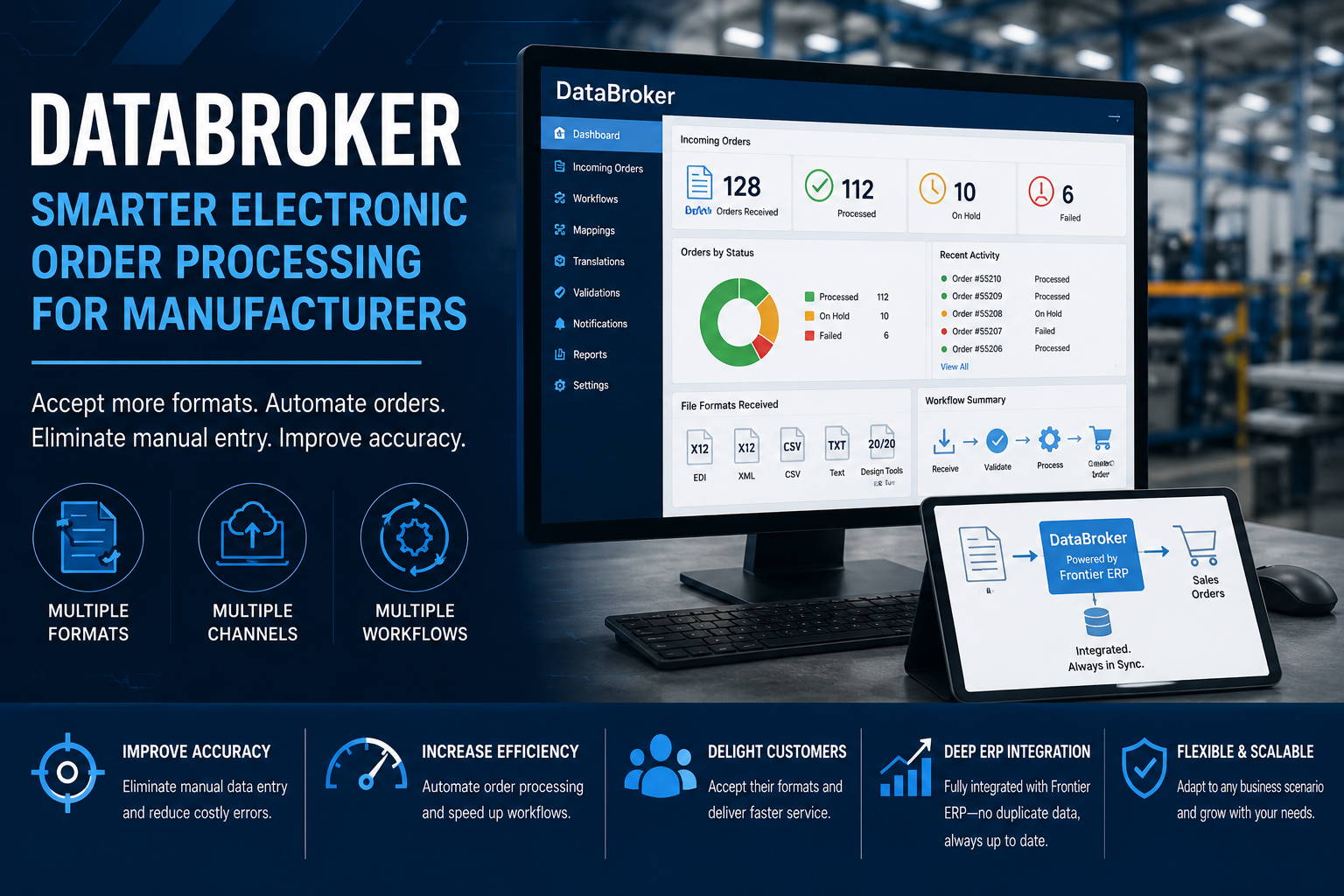
DataBroker is an integrated solution within the Frontier ERP ecosystem designed to streamline electronic order processing for both configured and non-configured products.
It enables manufacturers to:
- Accept multiple data formats
- Automate order entry
- Reduce manual intervention
- Improve order accuracy
Unlike traditional systems, DataBroker is built specifically to support the complexity of make-to-order manufacturing workflows.
Supporting Multiple Formats and Data Sources
One of DataBroker’s most powerful capabilities is its ability to handle a wide range of input formats.
Manufacturers can accept:
- Standard EDI formats such as X12
- XML, CSV, and text files
- Design files from tools like 20/20 and ProKitchen
Flexible mapping and transformation tools allow companies to translate customer data into internal product configurations without requiring custom programming .
This flexibility allows manufacturers to accommodate customer preferences without adding complexity to internal processes.
Eliminating Manual Order Entry and Errors
Manual data entry remains one of the most common sources of inefficiency in manufacturing operations.
DataBroker addresses this by:
- Automatically converting incoming orders into quotes or sales orders
- Validating pricing and order data
- Reducing reliance on spreadsheets and manual processes
This leads to:
- Improved accuracy
- Faster processing times
- Lower operational costs
By eliminating repetitive tasks, teams can focus on higher-value activities such as customer service and production planning.
Smart Workflows That Adapt to Your Business
DataBroker includes configurable workflows that adapt to different business scenarios.
Manufacturers can control whether incoming orders:
- Become quotations
- Are placed on hold for review
- Are automatically released as sales orders
Additionally, pricing validation rules ensure that orders outside acceptable tolerances are flagged for review, preventing costly mistakes .
These flexible workflows allow companies to maintain control while improving automation.
Correcting Errors Without Customer Disruption
One of the most significant advantages of DataBroker is its ability to handle errors internally.
If an issue arises, manufacturers can:
- Adjust mappings or translations
- Restart the workflow from the point of failure
- Avoid asking customers to resend orders
This capability improves efficiency and strengthens customer relationships by reducing friction in the ordering process .
Deep Integration with Frontier ERP
DataBroker is tightly integrated with the Frontier ERP platform, ensuring seamless data flow across the organization.
Key benefits include:
- Real-time access to current product models
- No need to duplicate or redeploy configurations
- Centralized storage of all quotes and orders
- Full visibility for order processing teams
Because all data resides within the core system, manufacturers avoid synchronization issues and maintain consistency across operations .
Improving Customer Experience and Retention
Modern customers expect convenience and flexibility when placing orders.
DataBroker supports this by allowing manufacturers to:
- Accept customer-preferred formats
- Provide faster order processing
- Reduce errors and delays
According to the DataBroker overview, this flexibility helps increase customer retention by accommodating diverse ordering requirements without additional programming .
Key Benefits of DataBroker
Manufacturers using DataBroker can expect:
- Improved order accuracy by eliminating manual processes
- Increased efficiency through automation
- Reduced reliance on traditional EDI systems
- Support for both configured and non-configured products
- Faster onboarding of new customers and formats
The system is designed to grow alongside your business and adapt to future requirements.
Why DataBroker Matters in 2026
As manufacturing becomes more complex and customer expectations continue to rise, flexibility and efficiency are critical.
DataBroker enables manufacturers to:
- Handle diverse customer requirements
- Streamline operations
- Reduce costs
- Improve responsiveness
For make-to-order manufacturers, these capabilities provide a significant competitive advantage.
Conclusion
In 2026, manufacturers need more than traditional EDI systems to stay competitive.
DataBroker offers a modern, flexible approach to electronic order processing that simplifies integration, reduces errors, and improves efficiency.
By leveraging DataBroker within the Frontier ERP ecosystem, manufacturers can streamline workflows, enhance customer relationships, and position themselves for long-term growth.
FAQ
What is DataBroker in manufacturing ERP?
DataBroker is an integrated solution within Frontier ERP that automates electronic order processing and supports multiple data formats, eliminating the need for manual entry and complex EDI customization.
How does DataBroker differ from traditional EDI?
Unlike traditional EDI, DataBroker supports multiple file formats, reduces custom programming, and allows manufacturers to correct errors without requiring customers to resend orders.
What types of manufacturers benefit from DataBroker?
Make-to-order manufacturers such as cabinet, millwork, door and window, and furniture companies benefit the most due to complex product configurations.
Does DataBroker require programming knowledge?
No. DataBroker uses table-driven mappings and transformations, eliminating the need for specialized programming skills .