

Does managing customers’ EDI orders feel like an uphill battle? Are you tired of wasting time manually entering complex orders? Custom manufacturers encounter many challenges during their day-to-day operations – electronic data transfers shouldn’t be one of them. Eliminate the hassle and welcome efficient electronic data capture with Frontier DataBroker. Frontier DataBroker is the solution to your electronic ordering requirements for both configured and non-configured products. Deeply integrated with Frontier ERP, our electronic data capture module revolutionizes the way you receive and process sales quotes, configurations, and orders. DataBroker enables you to accommodate the diverse ordering needs of your customers without significant investments in custom programming that traditional methods require.
Where Traditional EDI Falls Short
Traditional EDI (Electronic Data Interchange) transfers often struggle with the process of capturing and processing electronic data accurately. They frequently require extensive custom programming to adapt to different formats, leading to delays and data entry errors. According to EDI Academy, EDI integration, data accuracy, security risks, collaboration issues, and flexibility are common challenges when companies rely solely on EDI data transfers. These issues are not only frustrating but also leave your customers waiting for quotes and products.
DataBroker Simplifies Electronic Data Capture
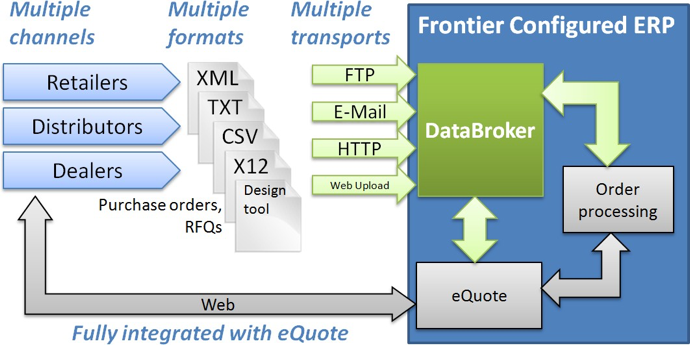
Why use traditional EDI when you can transfer in any format with DataBroker’s flexible electronic data capture? DataBroker is a great supplement to your online ordering website.
Unlike traditional EDI solutions, DataBroker can streamline data collection and improve data quality from different formats, even EDI. These include traditional EDI formats like X12, XML, CSV, plain text files, FTP uploads, emails, and even files from popular design layout tools such as AutoDesk and ProKitchen. DataBroker’s flexibility allows for capturing customer quotes and orders in their preferred format without the need for additional programming. DataBroker’s seamless electronic data capture and transfer capabilities not only ensure precision but also improve data management within the ERP system. As a result, you gain access to real-time ordering information for better inventory management and efficient production scheduling.
Adaptable Workflows for Effortless Data Management
DataBroker doesn’t just capture real-time data; it empowers you with adaptable workflows tailored to your business needs. Your customers have the option to choose what to do with the purchase orders you import. They can either turn them into quotes, keep them as sales orders, or have them processed immediately. With extensive pricing validation rules, you can ensure that orders align with your pricing policies, minimizing errors and discrepancies.
Efficient Error Correction
Electronic data capture workflows are designed to be resilient, allowing error correction without disruption. Even if it’s a formatting issue or a mapping error. DataBroker enables you to make necessary adjustments and resume processing orders seamlessly. Email notifications keep you informed of any issues, ensuring timely resolution and minimal impact on customer satisfaction. All quotations and orders are also kept in the centralized, real-time Frontier database. Orders are automatically run through the product configurator, so only buildable products can be ordered. Plus, your sales department always has full visibility of quotes, order status, and timelines.
Beyond DataBroker: Two-Way Data Exchange
DataBroker works great for electronic data capture. It streamlines getting design and order data into Frontier, but it is a one-way connection. If you need the ability to return information to the sender in real-time, we offer better tools. eQuote Dealer is a ready-made online sales order management tool that enables your sales team, dealers, or end customers to view inventory, schedules, and pricing in real time. eQuote Dealer is integrated with Frontier ERP and has all the functionality behind it. Because it accesses your central database in real-time, eQuote has the advantage of never being out of sync. If you prefer a completely branded experience, our eWebServices feature enables you to create a real-time, two-way connection between your Frontier ERP data and whatever you choose. This might be, for example, your website, Salesforce.com, or a retailer’s system. As with eQuote Dealer, you control what data is exposed, and to whom. >> Read more: While originally written for cabinet manufacturers, this blog article explains the difference between DataBroker, eQuote Dealer, and eWebServices, and when you might want to use each. Improve accuracy, enhance customer satisfaction, and maximize your investment with Frontier ERP and DataBroker today. Experience the difference seamless electronic data capture can make for your business. Contact us for a free demo.
Frequently Asked Questions
What is DataBroker and what types of order intake does it support?
DataBroker is Frontier’s electronic data capture module — it handles the intake of sales quotes and orders from external systems in the format those systems use, without requiring the customer to change their process or the manufacturer to build custom programming for each integration. Supported formats include traditional EDI (X12), XML, CSV, plain text files, FTP uploads, email attachments, and files from design layout tools including AutoDesk and ProKitchen. For custom manufacturers with large retail or commercial customers who insist on submitting orders electronically in their own format, DataBroker eliminates the manual re-entry that would otherwise be required.
How does DataBroker handle order validation and error correction?
When orders are imported through DataBroker, they’re automatically run through Frontier’s product configurator before being accepted — which means only buildable products can be ordered, even when orders originate from external systems. If an order contains a formatting error or a mapping issue, DataBroker allows corrections to be made and processing to resume without restarting from scratch. Email notifications alert the team to any issues so they can be resolved quickly. This creates a resilient intake process that catches problems at the point of entry rather than letting errors reach production.
What happens to orders once they’re imported through DataBroker?
Once imported and validated, orders enter Frontier’s standard order management workflow — they become visible to sales, production scheduling, inventory, and fulfillment in the same way as orders entered directly into Frontier. Customers have the option to have imported orders converted to quotes for review, kept as sales orders, or processed immediately depending on the workflow configured. All quotations and orders are stored in the centralized Frontier database, giving sales full visibility into order status and timelines regardless of how the order was submitted.
When is DataBroker the right choice versus eQuote Dealer or eWebServices?
DataBroker is the right choice when the primary need is accommodating inbound orders from customers who submit in their own electronic format — EDI, XML, design tool exports, and similar. It’s one-way: data flows into Frontier. eQuote Dealer is the right choice when dealers need a ready-made, out-of-the-box portal to configure, price, and place orders themselves with real-time Frontier data. eWebServices is the right choice when a fully branded, two-way integration with a custom front-end is needed. Many manufacturers use a combination — DataBroker for their large retail EDI partners, eQuote Dealer for their dealer network, and eWebServices for a branded customer portal.