
Manufacturing workers today are under mounting pressure. They are asked to do more, faster, and across more systems during their shift, without errors or costly mistakes. When their work tools and ERP software are hard to use, stress rises, turnover goes up, and employee productivity suffers. With the right ERP features, however, tasks become routine, onboarding goes faster, and employees gain confidence instead of burnout.
The best manufacturing ERP systems do more than optimize business processes. They support the people who use them. Frontier ERP is built for manufacturers, and their workers can do their jobs more easily and grow new skills on the job. This saves the company time and money and creates a positive work environment for all.
Why Employee Skills and ERP Software Complexity Matter
The future of manufacturing will belong to companies that not only invest in modern systems, but also in the people who use them. As the industry evolves, the skills gap is becoming impossible to ignore. The National Association of Manufacturers projects a shortage of 1.9 million workers by 2033, with nearly half of all open roles expected to go unfilled.
That kind of talent gap doesn’t just slow production; it threatens operational stability, increases security risks, and puts even the best technology investments at a disadvantage. In an ERP-enabled workplace, the value of the system is only as strong as the employees trained to operate, interpret, and utilize it.

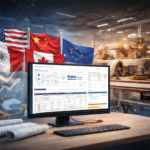
Frontier ERP with built-in CPQ software leads to increased employee productivity thanks to user-friendly software features.
Therefore, your ERP software must be user-friendly and perform tasks and processes as intended. When an ERP system is hard to use, employees avoid it or create workarounds. That leads to errors, frustration, and inconsistency across the company. On the other hand, when the system supports users instead of hindering them, everything improves: new workers learn faster, processes stay consistent, and productivity increases without adding stress.
Employees do not need more software. They need better software that makes their jobs easier and helps them grow, like Frontier ERP.
Frontier ERP Features That Improve Employee Productivity
1. User-Friendly Interface Makes Onboarding Easy
A well-designed ERP system shouldn’t slow people down; it should empower them. Frontier’s intuitive, user-friendly interface shortens the learning curve, enabling team members to get up to speed quickly rather than fighting with UI. Ease of use translates into faster adoption, greater confidence on the job, and more time spent applying employee skills where it matters most.
2. Built-In CPQ Software for Precisely Prompt Quotes
Sales reps, dealers, and customer service staff do not need spreadsheets, manual pricing, or constant help from engineering when formulating a quotation for their customers. Frontier’s built-in CPQ software includes a powerful product configurator, a dynamic real-time pricing module, and a complete, line-by-line quote generator for complex, custom orders. Your team can quickly generate quotes using Frontier’s eQuote Dealer or custom portals.
3. Real-Time Visibility Across the Organization
With role-based dashboards and customer portals, employees, dealers, and customers have direct access to the information they need in real-time. Dependent upon role security, they can check order status, inventory levels, shipping status, and production scheduling and progress on their own. By eliminating the need to track information via phone call or email, they instead get the answers they need instantly, without depending on someone else.
4. MES and Barcode Tools That Simplify Shop Floor Work
With MES and barcode tools, workers can scan materials, track labor, update job status, and move inventory, with no paperwork or manual entry required! This speeds up tasks, reduces errors, and keeps data flowing directly through the ERP. The built-in workflows also guide employees step by step, helping new staff fast-track their productivity and keeping seasoned workers focused on real production, not administration.

Frontier ERP automated processes put your company on the right track to a more productive workforce.
5. Automation That Handles Routine Work
Skilled workers pay attention when an ERP system eliminates repetitive tasks. Instead of feeling weighed down by manual processes, they’re able to be more productive, more efficient, and more engaged in their roles. Frontier ERP handles routine tasks such as sending alerts, updating statuses, generating purchase suggestions, and checking availability. This frees up employees to focus on higher-value work instead of repetitive tasks.
6. Robust Analytics for Better Decision Making
Frontier ERP features advanced reporting and analytics capabilities that can highlight critical KPI measurements. This can then help teams make more informed decisions about production runs, schedule changes, or shipping dates. Having employees who are well-informed and skilled in reading real-time analytical data is an enormous benefit for manufacturers.
How Frontier ERP Increases Productivity by Role
| Role | Frontier ERP Feature | Stress Removed |
|---|---|---|
| Sales & Dealer Teams | CPQ Software, eWebServices, and eQuoteDealer | Eliminates pricing errors and rework, letting sales focus on customers |
| Production Employees | MES and barcode scanning | Simplifies shop floor tasks, reduces paperwork, and removes guesswork |
| Purchasing Staff | Automated demand tracking and alerts | Reduces the scramble of last-minute orders and shortages |
| Finance Teams | Fully integrated data | Eliminates manual reconciliation and reduces mistakes |
| IT/Admin Teams | Configurable tools | Reduces reliance on custom coding and workarounds |
When your employees feel supported every day, productivity goes up. Onboarding is faster, mistakes go down, engagement improves, and turnaround time is shorter. Fewer delays, higher output per person, stronger customer relationships, and lower turnover all flow from that. When your ERP supports your people, your people support your business.
Why Frontier ERP Is So User-Friendly
1. Designed for People, Not Just Data
Frontier ERP was built for the people who use it, not just the data it manages. Screens are clean and role-based, so employees see only what they need. Workflows follow real manufacturing processes, reducing extra clicks, confusion, and rework.
2. Integrated Tools That Simplify Work
Every feature is designed to feel like a tool that helps, not software that gets in the way. Optional components such as CPQ, MES, iDispatch, eQuoteDealer, and customer portals integrate seamlessly when the business is ready for them.
3. Multiple Training Methods
Friedman offers a comprehensive client education program led by application experts who provide training tailored to each customer’s industry and business needs. Training is available on-site, at Friedman’s Chicago headquarters, or through small, hands-on classes designed for open discussion and practical learning, including “train-the-trainer” options for internal teams.
Clients also have access to an online Frontier Documentation Wiki, which expands on official product documentation with tutorials, FAQs, technical specs, and eQuote resources. Access is provided through a shared company login, which can be requested through the customer portal. Both the training schedule and wiki access details are available through the Frontier Customer Portal.
Conclusion
You deserve a workforce that has the best tools to do their jobs. With Frontier ERP, you can reduce stress, build employee skills on the job, improve daily productivity, and create a team that is confident, capable, and fully supported. When people have the right system behind them, they do not just work faster; they work smarter. It’s a win-win for any manufacturer.
Would you like to learn more about Frontier ERP features, user-friendly interface, and training options? Contact us today!